

An ad hits, and suddenly creative heads want it running across every SKU by Friday.
A founder watches a competitor’s ad take off and asks why theirs can’t do the same, just with their own product in it. A media buyer spots a structure converting on someone else’s account and wants it adapted before the format cools off.
Different triggers, same outcome. The team rebuilds the ad from scratch, and 3 weeks later, the new version doesn’t quite land the same way.
Here’s what most people miss.
The ad didn’t win because of the product. It won because of the structure, the hook, the tension, the proof, the task. That part travels.
The real skill is protecting what already works, and only touching what needs to.
The real problem with ads and SKUs
The trouble starts the moment someone says “just do the same thing” for the other SKUs
- Teams disagree on what “the same thing” means. The editor protects the visual style. The copywriter protects the hook line. The media buyer just wants the same thumbnail because that’s what’s getting clicks. Everyone’s guarding a different piece, and most of the time, they’re all half right.
- “New SKU” turns into “new project,” and speed dies with it. A fresh brief gets written. A fresh shoot gets booked. The pacing that made the original work gets rebuilt from memory instead of copied exactly, and memory is not a production tool. By the time the “quick adaptation” is done, the two weeks it took have already killed the one thing that made the original ad worth copying: momentum while the format still felt fresh.
- Fatigue sets in by SKU three. Rebuild a winning ad by hand a few times, and attention starts slipping. Corners get cut. The structure that worked for Pulseline Core slowly turned into something else, not because anyone chose to change it, but because nobody had the bandwidth to protect it that many times.
Recreating a Winning Ad for New SKUs and Offers
Every idea sounds clean until you actually try it. So let’s understand it through one real ad, the one that had been working for Pulseline Core Tee, and see what it takes to rebuild it for Pulseline Active instead. Same product line, same core message, but a different fabric and a different use case.
Step 1: Get your product shots ready
Before anything else, get clean shots of the product ready. This is the foundation everything else builds on.
- Shot on a plain white background. No lifestyle setting, no clutter, nothing competing with the product.
- Straight-on, wide-angle. Keep the full product in frame, evenly lit, no harsh shadows, no props, no styling. Just the product itself.
- Logo clearly visible. If brand recognition matters in the ad, make sure it’s not hidden in a fold or shadow.
- A close-up on texture or material, especially if that’s the actual difference between this SKU and the original.
Step 2: Map the original ad’s structure
Once the shots are ready, go back to the ad that actually worked and break it down piece by piece. Not by feel, by sequence.

Start with the hook. For instance, what happens in the first 2 to 3 seconds? Is it a question, a bold claim, a visual surprise?
The “pattern interrupt”. Where does the ad shift gears, from problem to solution, from claim to proof?.
Next is the proof moment. Is it a review, a stat, a before-and-after, a close-up demo? And a CTA. How is it phrased, and where does it land, mid-ad or right at the end?
Write this down. Literally, in a doc, shot by shot if needed. This becomes the map that the recreation follows.
Step 3: Let Designkit build the recreation
Shots are ready. Structure is mapped. Now the actual generation happens, and it’s faster than most people expect.
Open Designkit’s AI video ad recreation tool, Video Recreation. Drop in the original Pulseline Core Tee ad, either as a TikTok or Reels link, or as a raw video file. Add the clean product shots for Pulseline Active alongside it.
Write a prompt that locks in what should carry over. Product type (T-shirt), video style (UGC, a guy talking straight to camera, casual delivery), aspect ratio (9:16), scene setup, a short line on the model. If starting from a blank prompt feels like extra work, there are ready-made templates to build from instead.
Generate, preview, download. What comes back is a ready-to-use UGC-style ad, same hook, same pacing, same proof moment, same CTA, just with Pulseline Active on screen instead of the original tee. Pick 9:16, preview it instantly, download it. Minutes, not days.
Now that you have the video for your first SKU, generate the videos for other SKUs.

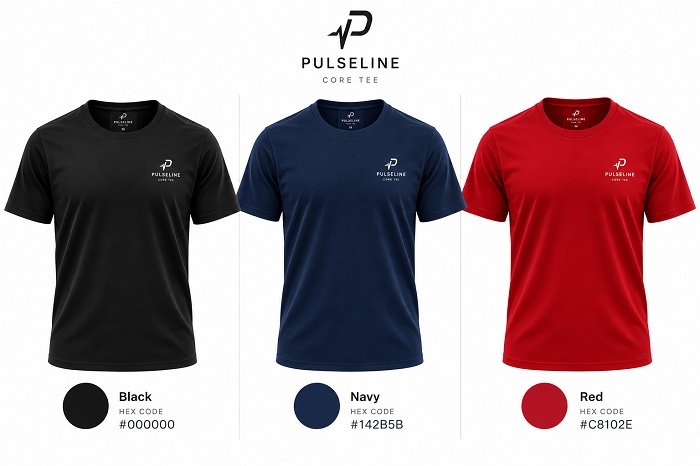
For instance, after the black T-shirt, we can create the navy blue T-shirt.

And then we can proceed with other SKUs and so on.

One thing worth doing before calling it done: watch the full clip once, check the product looks natural in every frame, and confirm nothing in the pacing feels off. Most of it holds up right out of the gate.
Step 4: Check it, then track it
Before it goes live, watch the full ad once. Confirm the product looks natural in every frame, the CTA matches the offer, and the pacing still feels right. Once it’s running, three numbers matter most:
- Hook retention in the first 3 seconds. A drop here usually means something shifted in the opening.
- CTR against the original ad, not category averages. That’s the real benchmark.
- CPA once spend picks up. Close to the original’s numbers means the structure is held.
You can also use Designkit tool to reuse your existing video content, such as removing watermarks, enhancing the video quality and more.
A wide gap rarely means the tool failed. It usually means the SKU needed more than a swap.
What “Good Quality” Actually Looks Like on the Output
A recreated ad can look fine at a glance and still have small issues that hurt performance. Worth checking closely before it ships:
- Brand logo visibility. Make sure it’s not lost in a fold, a shadow, or a fast cut. If the logo mattered in the original ad, it needs to matter here too.
- Colour accuracy. Match the product’s actual hex codes against what shows up in the video. Lighting shifts during generation can make a product look slightly off, too bright, too washed out, or a shade darker than it actually is.
- Motion consistency. Watch how the product moves across the clip. Fabric should fall and move naturally on a tee; a wearable shouldn’t warp or float unnaturally on a wrist. Anything that looks stiff or slightly “off” in motion is usually the first thing viewers notice, even if they can’t say why.
- Hand and grip details. If someone’s holding the product, check that fingers sit naturally around it, nothing overlapping oddly or floating slightly off the surface.
- Close-up zoom quality. For anything worn- a ring, a band, a watch- zoom in on that specific frame. Texture and edges tend to blur first when something’s slightly off, especially in a fast-cut ad where viewers only get a second to register it.
None of these needs a trained eye to catch. A slow, full-length watch before publishing catches almost all of it.
Final Words
Rebuilding every ad from scratch usually comes from a good place; teams want each SKU to feel considered. But somewhere in that process, the one thing that actually worked, the structure, gets lost.
Keeping it intact isn’t cutting corners. It’s protecting the hard part, the hook, the pacing, the proof, the task, and only changing what genuinely needs to change.
That’s the real shift. Not just fast, but faster, since the difficult work is already done.
In the proper configuration, you’ll be able to recreate viral video ads in minutes and use the extra time for the single judgment that cannot yet be left up to the machine – whether the new SKU will need the same story or a different one.
